Hi! I'm Meritxell Gil.
Take a look at some of my work here.
Project overview
The product
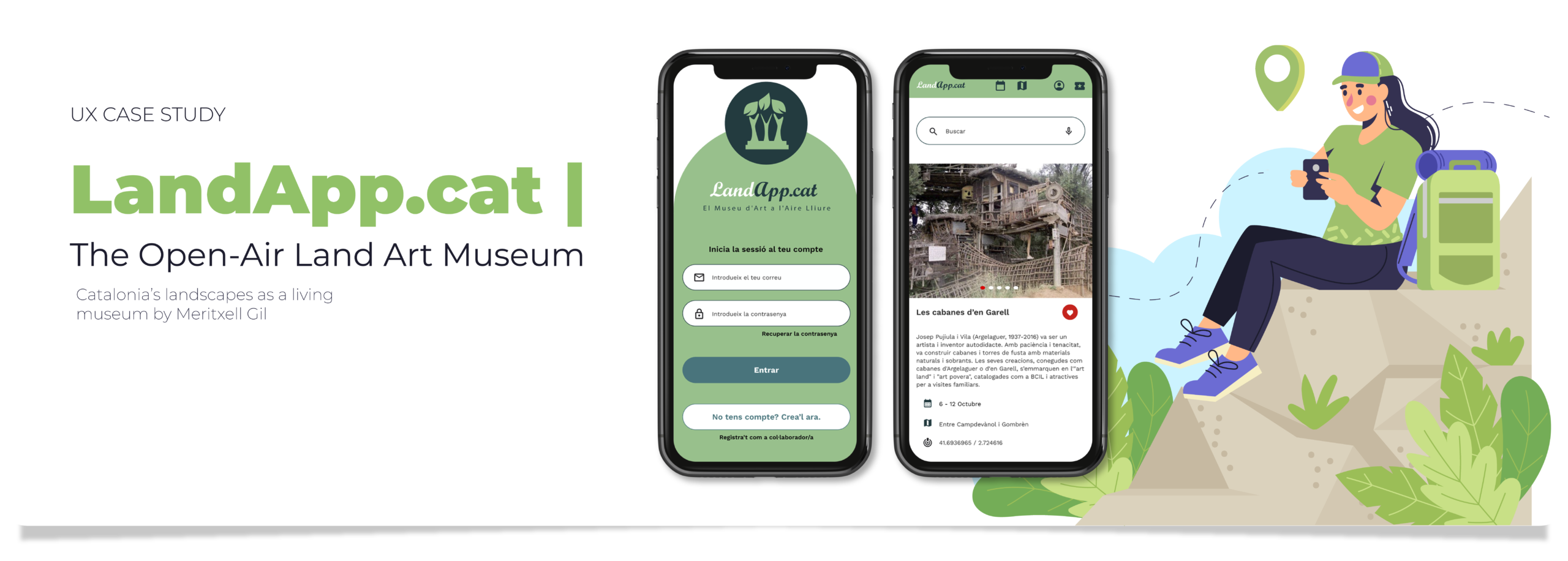
LandApp.cat will enable users to discover, plan, and participate in land art and outdoor cultural activities that will affect art lovers, local communities, artists, and travelers through an accessible, responsive digital platform connecting culture, nature, and people, facilitating access to artistic interventions and promoting social interaction, mobility, and landscape appreciation. We will measure effectiveness through planned visits via the app, event participation, artwork reach, and user and artist satisfaction.
General Objective: Create an app that brings together and showcases art based in the Catalan territory, respecting and highlighting artworks in their original locations, while also facilitating visit planning with information on transportation, accommodation, and local services.
Specific Objectives and Success Metrics:
- Improve access to dispersed artworks through an interactive map and customizable filters.
- Preserve the original context of the artworks, avoiding their decontextualization.
- Increase participation in Land Art events and visits to cultural landscapes.
- Facilitate user logistics through recommendations for accommodation, food, and transportation.
Success Metrics: number of visits planned through the app, participation in events, reach/visibility of the artworks, and satisfaction of users and artists.
My role & responsibilities
I led the end-to-end UX process, including the definition of the design system, navigation flows, and a strong focus on overall user experience. The technical team will be responsible for developing the solution, while I will handle the frontend layer, taking potential future funding into consideration. The project scope covers both frontend and backend development.
An initial feasibility and market interest analysis was conducted, along with a preliminary definition of the target audience beyond a purely design-driven perspective. This work establishes a solid foundation for a project with clear growth potential, developed with the support of the Krei24 association.
Tools used
Figma for design and prototyping, Miro for ideation and collaboration, Google Antigravity for no-code frontend development, and Adobe Suite for logo creation and selected graphic design assets.
The problem
- Art installations outside traditional museums are dispersed and unmanaged, making discovery difficult and limiting access to full cultural experiences.
- When land art, graffiti, or performance pieces are removed from their original environment, they lose context, meaning, and emotional impact.
- Rural artworks are hard to reach without transport, and scarce information on services like lodging and dining discourages prospective visitors.
The goal
- Create an app unifying and showcasing Catalonia’s place-based art, improving access to cultural landscapes.
- Respect and highlight artworks in situ, preventing decontextualization and preserving their original significance.
- Include an interactive map with recommendations for nearby lodging, dining, and services to ease planning.
Understanding the user
Research objective
The primary objective of the research was to understand how different user profiles plan and experience cultural activities across the Catalan territory, particularly those related to Land Art and nature-based cultural experiences.
The research aimed to identify:
- Cultural and social motivations
- Access barriers (physical, digital, and logistical)
- Unmet needs in planning cultural activities outside urban environments
- Opportunities for improvement through a user-centered digital solution
Research Methods
A mixed-methods approach (qualitative and quantitative) was used to gain a broad and validated perspective:
Secondary Research
Analysis of official reports and studies on cultural participation and mobility in Catalonia, including:
- Observatori de la Cultura
- ICEC
- IDESCAT
- CoNCA (National Council for Culture and the Arts)
Quantitative Surveys: Used to validate patterns identified in interviews and measure behavioral trends.
Contextual Observation: Conducted at festivals, museums, and Land Art routes (e.g., KMINART) to understand how users interact with the environment, signage, and available information.
Research Findings
General Cultural User Profile: The analyzed data indicates that:
- Cultural participation is strongly influenced by education level, age, and social class.
- The most common profile consists of adults between 30 and 60 years old with secondary or higher education.
- There is growing interest in experiences that combine art, nature, and sustainability, particularly when they include a social component.
Main Pain Points
Lack of integrated information
Cultural information is fragmented across municipal websites, social media, tourism offices, and disconnected platforms.
Accessibility barriers: Physical barriers include long routes and insufficient information on access points or adapted parking. Digital barriers involve platforms that are not inclusive or user-friendly for older adults.
Rigid cultural offerings: Schedules that lack flexibility and do not adapt to families, working professionals, or users with time constraints.
Planning complexity: Coordinating transportation, dining, and schedules requires excessive effort and discourages participation.
Persona

- Name: Miquel
- Age: 60
- Pronoms: He/His
- Race: Mediterranean
- Education: Higher education
- Hometown: Barcelona
- Family: Has wife, family and a group of friends
- Occupation: Secondary school teacher
User story
As someone who enjoys nature but is unable to go on long walks, yet frequently visits museums in Barcelona—especially those featuring Catalan culture—with my wife, I want a very intuitive and easy-to-use tool that allows me to discover and attend cultural activities in nature, adapted to my limited mobility.
Problem statement
I am passionate about local heritage and nature. I prefer accessible, traditional cultural experiences that I can comfortably enjoy with my wife without having to take long walks. Easy parking and nearby restaurants are important to me.
Goals
- Visit museums of Catalan art and history.
- Participate in cultural activities with his wife, family and friends.
- Before using a cane, she loved taking walks in nature. She enjoys visiting scenic landscapes and dining out.
Frustration
Difficulty with complex technologies and can’t walks to much.
“I love walking through the countryside and exploring hidden spots that showcase my country’s art and culture.”
User journey maps
| ACTION | 1. Discovers the festival | 2. Checks basic information | 3. Plans the day | 4. Solves logistics and transport | 5. Attends the event | 6. Remembers and shares experience |
|---|---|---|---|---|---|---|
|
TASK LIST |
– Hears about the Bear Festival – Looks for a cultural plan with his wife |
– Visits a website or app – Wants to know where, when, and how to get there |
– Read the event program – Calculate the best arrival time to see what interests you – Make a reservation at a nearby restaurant for two |
– Search for directions and parking – Want to avoid crowds |
– Use the app to track schedules and last-minute changes – Enjoy the activities and take photos with your wife |
– Share photos – Give feedback – Find similar activities nearby |
|
FEELING ADJECTIVE |
Curious / Motivated
|
Attentive /
Slightly confused
|
Organised / Unsure
|
Careful / Tense
|
Excited / Engaged
|
Satisfied / Thankful
|
|
IMPROVEMENT
OPPORTUNITIES |
Inspiring content to show local values and cultural roots.
|
Clear landing page with schedule, location, and access, plus local tips from participants.
|
Suggested route with minimal walking.
|
Accessible parking options shown clearly and real-time traffic and access info.
|
Alerts before each event.
|
Taste-based recommendation.
Feedback and rating tools.
|
And what about back office users?
The final product is divided into two main, distinct but interconnected usage environments:
- Users (Front Office)
- Collaborators and Administrators (Back Office)
Each environment addresses different needs and provides specific functionalities. While our focus will be on the end user, it is also possible to see how collaborators can submit their proposals through the back office.
Design Process, Wireframes, and Validation
Team Process (UX Process)
The design of LandApp.cat followed an iterative, user-centered process based on research, progressive prototyping, and early validation.
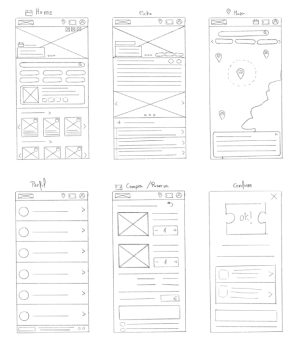
Paper wireframes
This paper wireframe explored a mobile app to discover cultural and artistic activities outside urban centers. The concept combined a map-based search with complete plans including nearby lodging, food, and public transport, plus tools to filter by preferences and share with friends. The goal was to design a holistic, user-centered experience that connects culture, landscape, and logistics in one place.
Digital wireframes
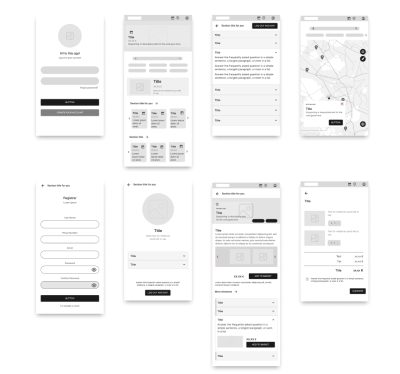
Login & Sign-Up: Secure entry with account creation, password recovery, and external login options.
Profile: Manage personal data and preferences.
Home: Explore activities via map or agenda; includes customizable sections and featured recommendations.
Map: Locations organized by category; access detailed activity pages.
Activity Detail: Key information, photos, and nearby recommendations.
Purchase / Booking: Select services, secure payment, and legal compliance.
Confirmation: Centralized booking summary, accessible in-app and sent via email or phone.
Main user Flows
Digital wireframes
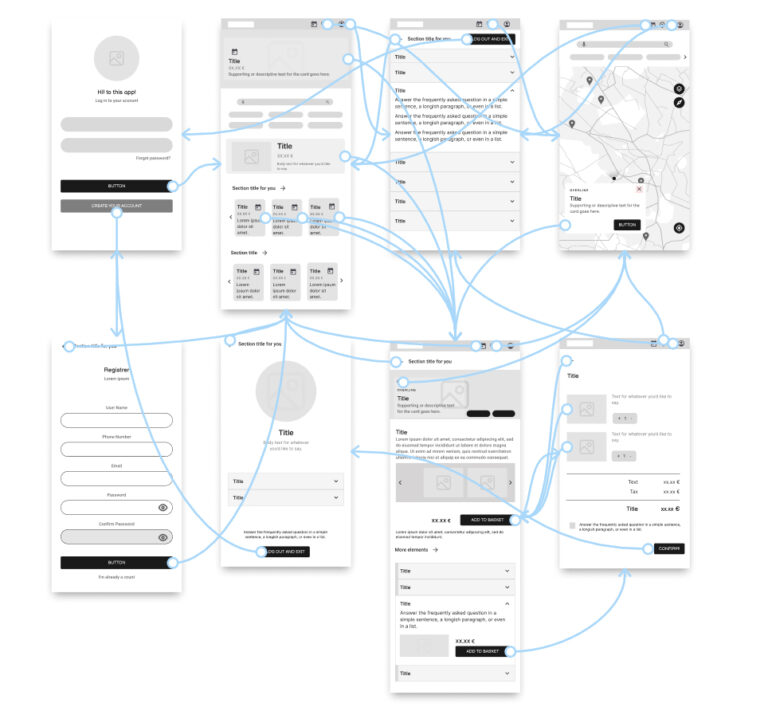
The main flow was designed to allow users to:
- Discover a cultural activity
- Quickly understand where, when, and how to access it
- Plan their visit (mobility, dining, schedules)
- Book activities and services from a single interface
- Receive confirmations and reminders
Back Office (Collaborators and Administrators)
The back office was designed as a simple yet robust system to:
- Create and schedule activities
- Manage multimedia content
- Link activities across different administrators
- Keep information updated and contextualized
Refining the design: Usability testing
Redesign – User Study Results (October 7, 5 participants)
Test Objective: To evaluate whether users could discover a cultural activity and complete a combined booking (activity + restaurant), as well as to identify navigation friction and interface comprehension issues.
Key Learnings
- The search flow requires clearer visual distinction between results and highlighted content.
- The map is powerful but needs more visible integration into the main flow, rather than being separate.
- The combined checkout should clearly display all reserved items.
- The app’s value proposition is perceived as highly useful and accessible, especially for users with planning or accessibility needs.
- Users appreciate that all information is centralized and consistent, avoiding the need to jump between multiple websites or apps.
- Overall, the experience is enjoyable and clear, suitable for both tech-savvy and less experienced users.
Context and Task
Scenario:
“Imagine you want to go to the countryside to participate in a cultural activity, such as Les cabanes d’Argelaguer, and then book a restaurant.”
Participants were asked to focus on:
- Ease of use
- Difficulties encountered
- Doubts or confusion
- Positive or negative surprises
Final designs and visual system
Design system / UI components
A simple but complete design system was developed, including:
- Consistent color palette and typography.
- Clear and legible iconography.
- Reusable components: buttons, cards, forms, and notifications.
- Accessibility considerations (contrast, readability, keyboard navigation, and screen reader compatibility).
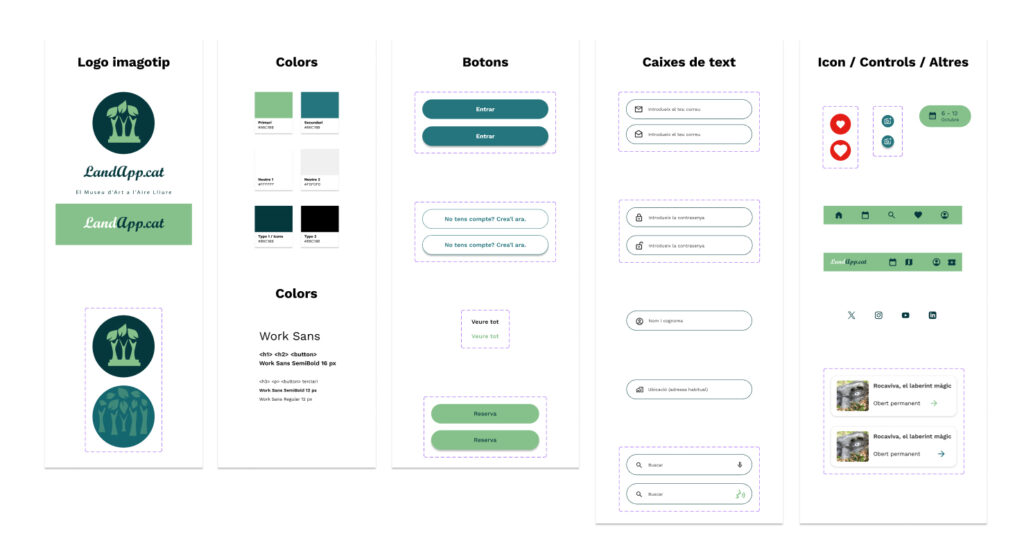

Please click the link below to access the Design System and the UI component library
The final product has two environments: users (Front Office) and collaborators/administrators (Back Office), each with specific functionalities, interconnected and tailored to different needs.
Front Office
The user environment is designed for people who want to discover, plan, and enjoy local offerings in a simple and contextual way.
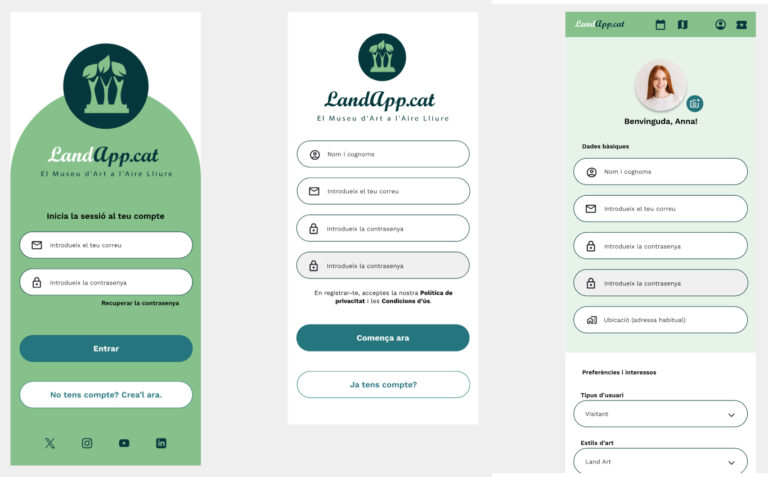
Login & Sign-Up
Initial entry point that allows users to securely create an account or access an existing one. Includes password recovery and external login providers to streamline onboarding.
Profile
Personal space where users can update their information, modify preferences, and review saved activities or reservations, contributing to a more tailored experience.
Home
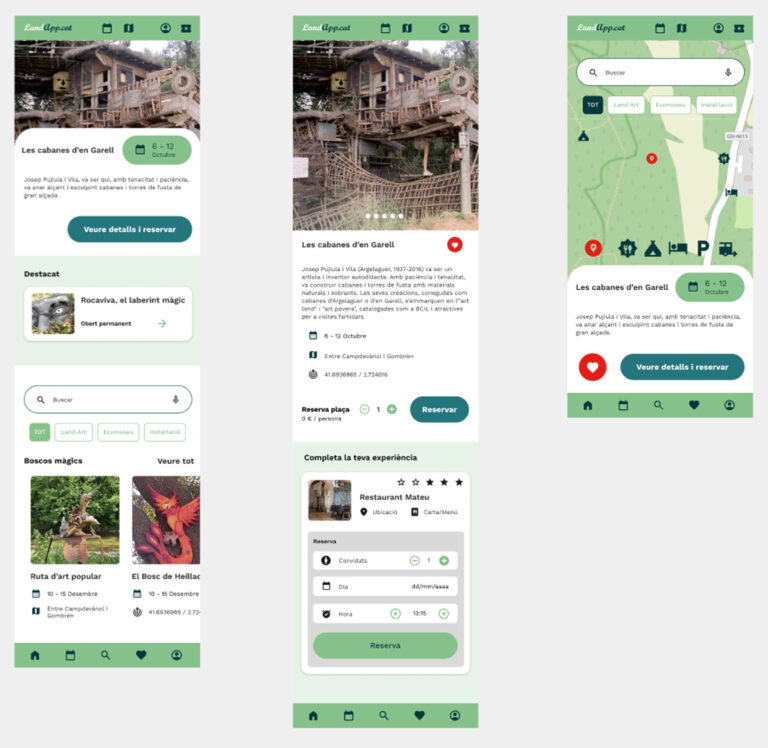
Main navigation hub after login. Users can browse cultural activities through a map or agenda view, discover highlighted recommendations, and personalize content using configurable sections.
Map
A geographical view that organizes activities by category and precise coordinates. Selecting a location opens a preview with essential details and a direct path to the full activity page.
Activity Detail
Comprehensive information including date, schedule, location, organizer, price, image gallery, and suggestions for nearby activities, accommodation, food options, and mobility services.
Purchase / Booking
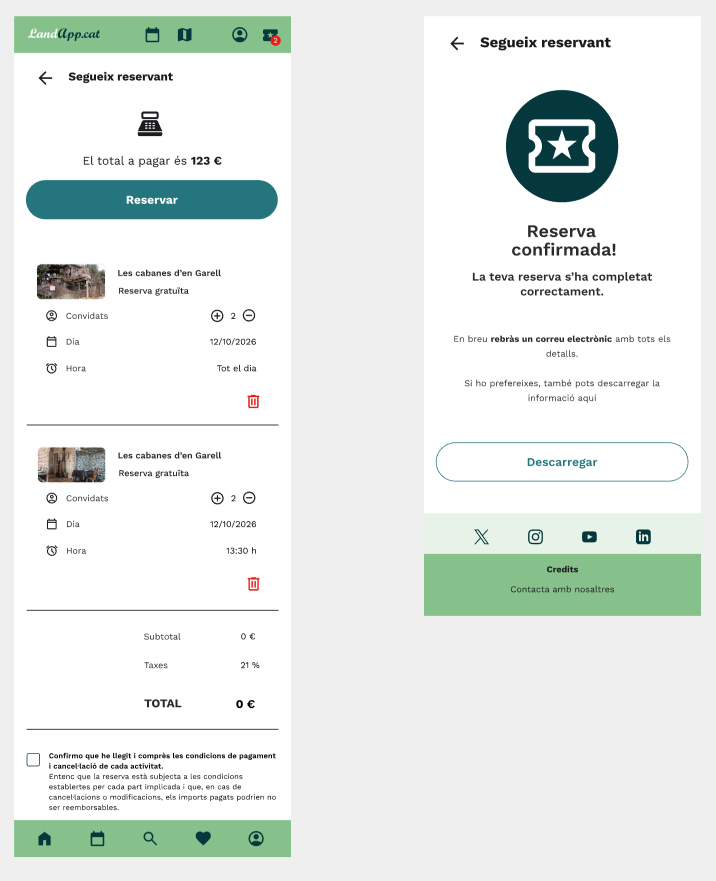
Final step for reserving tickets and complementary services. Users can combine offerings from different providers in a single checkout with secure payment and full compliance with legal requirements.
Confirmation
A centralized screen summarizing all booking information. The confirmation is stored in-app and also sent via email or phone for easy access during the event.
Back Office
The administrator environment is designed to facilitate the efficient creation, management, and organization of activities, allowing users to upload content, schedule it over time, and keep it up to date in a simple and structured way.
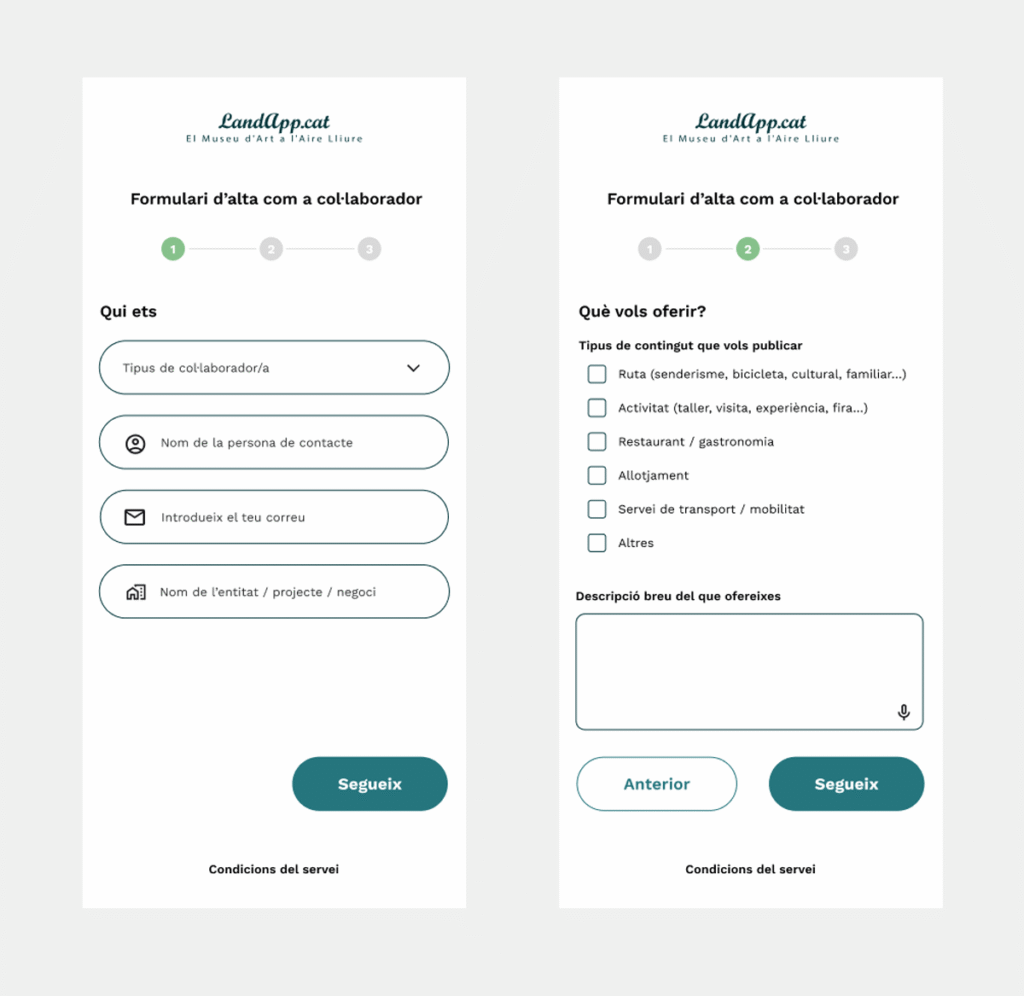
Access and Registration
Access is provided through a dedicated login for collaborators.
New users can apply to become collaborators, following a registration process that includes:
- Prior approval by the administration
- Profile validation before being allowed to publish content
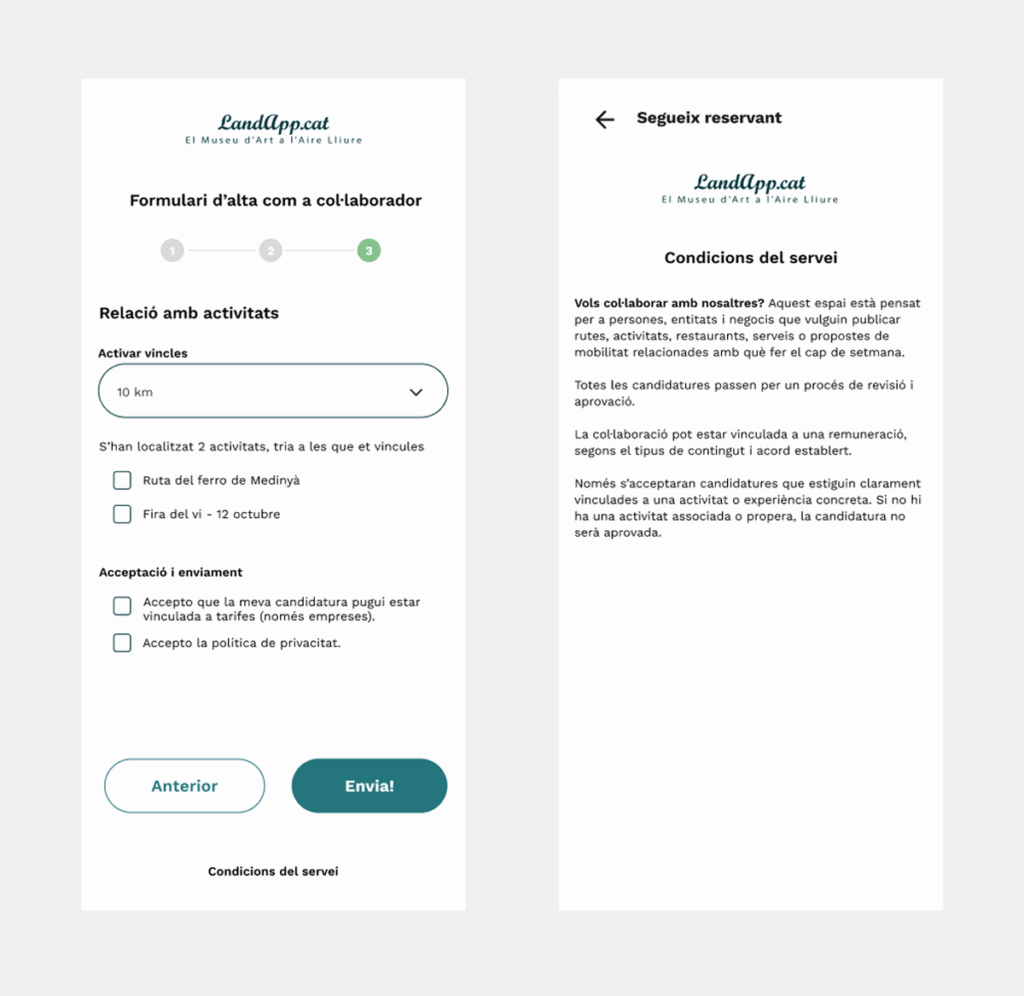
Register as a collaborator
- Who are you?
- What do you want to offer?
- Relationship with activities
- Terms and conditions of the service
Activity Management (Content Administrator)
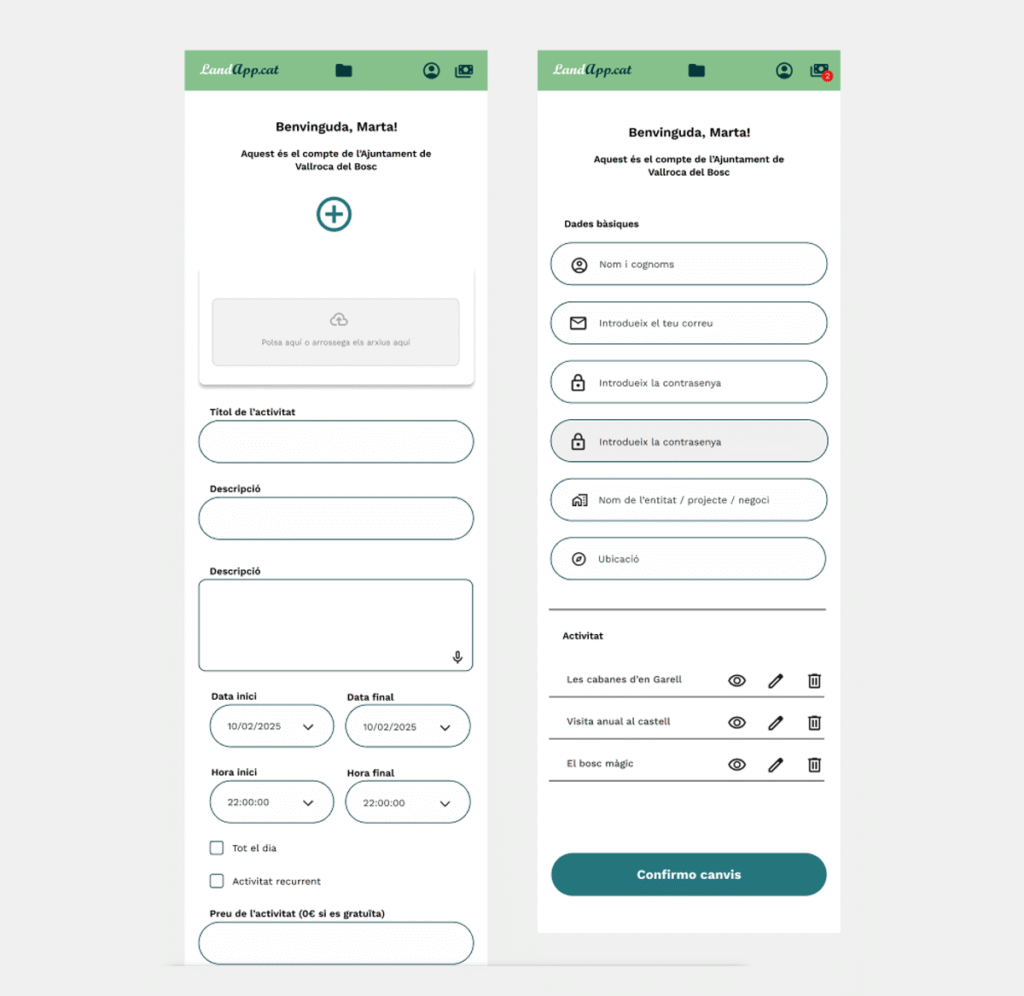
The content administrator has access to a dedicated management system that includes personal information and a list of activities, which can be viewed, edited, or deleted.
This system allows administrators to:
- Create new activity proposals
- Schedule activities according to different times of the year
- Set up recurring activities that repeat annually
- Upload and manage images
- Edit or remove existing content
- Define whether an activity is free or paid
Content Linking
The system allows content to be linked across different administrators in order to enhance the user experience.
How linking works
An administrator can request a link to another piece of content.
The receiving administrator can then:
- Approve the link
- Reject the link
Once approved, the linked content is displayed together in the front office, enabling:
- Discovery based on proximity
- Connections based on thematic interest
- A more complete and contextual experience for the user
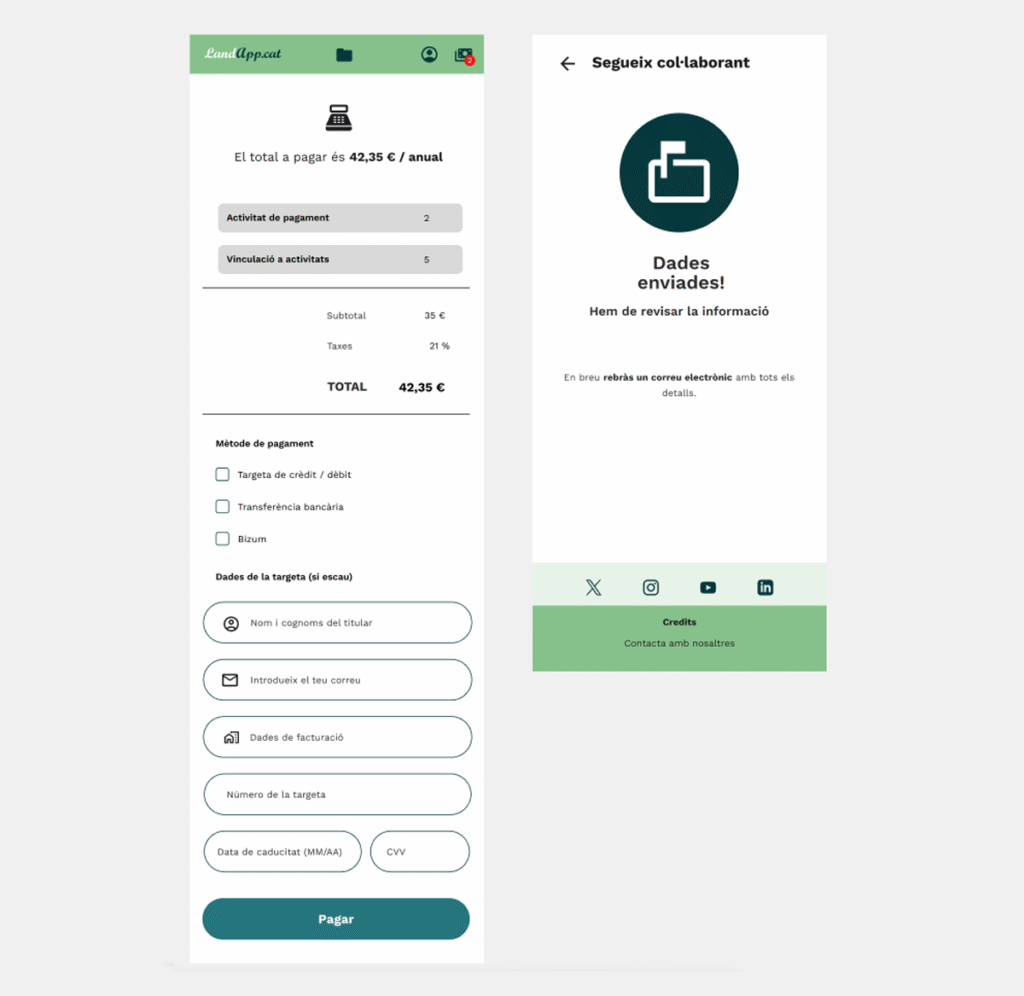
Economic Model
Free activities: No additional fees apply.
Businesses and profit-generating activities: An annual fee is required in order to publish and manage content on the platform.
Key user flow demo
Please click the link below to access the Design System and the UI component library
Although the main user flow has already been defined, some essential elements remain pending for a full release: privacy policy page, terms of use, cookie management (if user registration is enabled), and password recovery.
These components are planned for a second implementation phase, in coordination with the development and legal teams.
Next Steps
This project demonstrated how user-centered research and continuous iterations on interactive prototypes can transform an idea into a clear and useful digital experience for audiences with cultural and tourist interests. The focus on accessibility, navigation, and data visualization is essential for apps that serve as cultural guides.
The application will continue evolving throughout 2026. Upcoming features will focus on internal management to ensure operational consistency and efficient content updates.
LandApp.cat: Catalonia’s Open-Air Land Art Museum will allow the addition of new locations and services (restaurants, hostels, campsites, and transportation), always with prior authorization from the relevant parties and review by an administrator.
The project was developed during the duration of the course (2025-26).
🤗 Interested in this project? Great!
It is important to highlight that the app is a living and evolving project, currently seeking funding. If you are interested in supporting or collaborating, please contact hola@krei24.com.